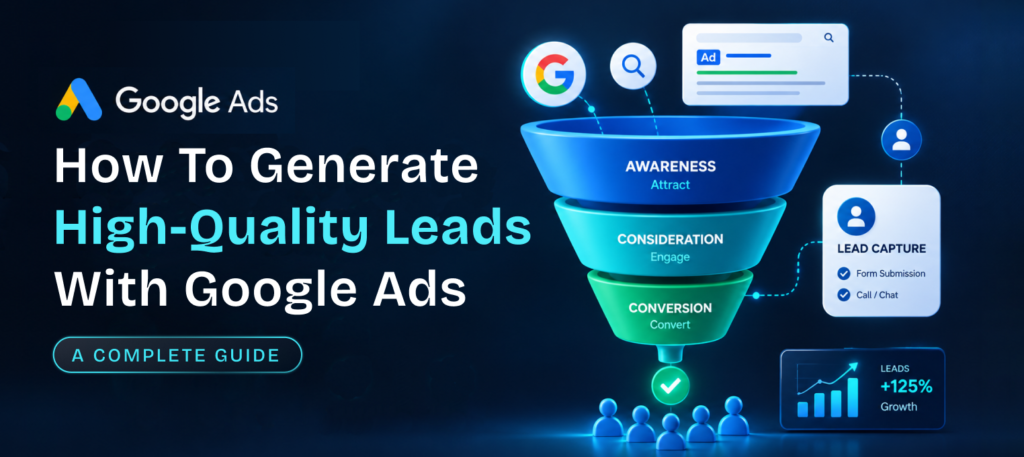
Quick overview: Google Ads for lead generation works best when you aim for qualified prospects and not the cheapest form fill. To get there, target keywords that show buying intent, match your ads and landing pages to the search. Choose the right way to capture the lead and send real sales outcomes back to Google Ads so it learns which leads are worth paying for.
More leads do not automatically mean more customers and anyone who has watched a sales team call a list of people who never wanted the service knows how expensive that gap can get. A campaign can show a low cost per lead and a healthy number of form submissions while the people behind those forms are students, job seekers or shoppers who were only comparing prices.
That is why google ads for lead generation should be judged by the quality of the people it brings in and not only by how many it brings in. Google Ads can deliver both, but only when keywords, ads, landing pages, tracking and follow-up all point at the same kind of customer. This guide explains how lead generation with Google Ads actually works, seven practical ways to raise lead quality, how to measure results honestly, the mistakes that waste budget, and when it makes sense to bring in specialist help.
How Google Ads Generates Leads
Google Ads generates leads by showing your ad to people who are searching for or browsing something related to your business and then giving them a way to raise their hand, whether that is submitting a form, calling or booking. In Google ads lead generation, the search itself is the strongest signal, since someone typing “emergency plumber near me” has told Google exactly what they need right now, which is very different from someone who simply happened to see a banner.
There are two main routes after the click.
- The person lands on your website, reads a landing page and then fills in a form or calls, so the conversion is recorded on your site.
- They use a lead form asset, which lets people submit their contact information directly inside the ad without visiting your site at all.
The website route gives you more room to explain and filter, while the in-ad form is quicker for the prospect, so each has a place depending on how much qualification you need before the first conversation. Let’s dive into multiple ways of generating leads in a real life scenario.
7 Ways to Generate High-Quality Leads With Google Ads
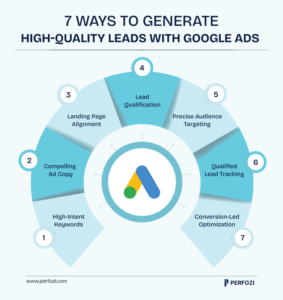
These seven ways move from what you target, to what people see, to what you measure, and together they form a complete Google ads lead generation strategy and not a list of isolated tips.
To keep them concrete, imagine a company that sells commercial cleaning contracts to offices (a hypothetical example we’ll use throughout).
1. Target Keywords That Signal Buying Intent
Target keywords that show someone is ready to hire, such as “office cleaning service pricing,” instead of broad terms like “how to clean an office.” The first searcher is comparing providers and the second is looking for a do-it-yourself guide, so they may click the same ad but they are very different leads. Add negative keywords such as “jobs,” “free,” “DIY” and “course” as well, so your budget stops flowing to people who were never going to buy, and review the search terms report regularly to find new ones.
2. Write Ads That Attract the Right Prospects
Good ads say who the service is for, what you do and any detail that filters out poor fits, such as your service area, minimum contract size or a starting price range. This usually lowers the number of clicks, which feels like a loss, but it also lowers the number of wasted ones, because people who cannot or will not buy have already opted out. A high click-through rate is not the goal here, and an ad that attracts fewer but better-matched clicks often serves the business more.
3. Match Landing Pages to the Search and the Ad Promise
The landing page should repeat what the searcher asked for and what the ad promised, with one clear action to take next. If someone clicks an ad about office cleaning quotes and lands on a general homepage, they have to hunt for the next step, and many won’t. A focused page with proof such as client names or reviews, a short explanation of the process and a form that asks one or two qualifying questions, like office size or location, gives you better leads and a better experience for the people who do reach out.
4. Choose Lead Forms or Landing Pages Based on Qualification Needs
Use landing pages when you need to explain your offer and screen people before they enquire, and use lead form assets when speed matters and the offer is simple. Google’s own help pages note that the “More qualified” lead form type may use more steps, while “More volume” uses fewer, which shows the trade-off clearly, because every step you remove adds submissions and every step you add filters them. With google ads lead generation forms, add questions that help your sales team decide who to call first, and make sure submissions flow straight into your CRM, since a lead that sits unseen in an inbox goes cold quickly.
5. Use Targeting and Exclusions to Reduce Irrelevant Clicks
Narrow your campaigns to the locations, hours and audiences you can actually serve, so the budget is not spent on people outside your reach. If your cleaning company only serves one metro area, a campaign running nationally will collect enquiries you must turn away, and the same goes for ads running overnight when nobody is available to answer. It also helps to exclude your existing customers when the goal is winning new ones, since they would otherwise count as fresh leads and make results look better than they are.
6. Track Qualified Leads and Sales, Not Just Form Submissions
Tell Google Ads which leads become real opportunities by importing outcomes from your CRM, because otherwise it optimizes for what it can see, which is usually the number of forms. Google Ads has qualified lead and converted lead goal types for exactly this, tracking leads that were further qualified or closed outside of Google Ads. Google’s lead quality guidance adds several useful rules, which are to map the full lead-to-sale journey, to pick one conversion goal for bidding and not mix goals from several stages, and to upload conversion data regularly, ideally daily. It also reports that advertisers using enhanced conversions for leads see about 10% more conversions on average than with standard offline imports, which is why this setup is central to how you track and attribute google ads lead generation properly.
7. Use Conversion Data to Improve Bidding and Campaigns
Once Google Ads receives qualified-lead data, its bidding can steer toward people who resemble your best customers and not just anyone who fills in a form. If you cannot assign a different value to each conversion, Google recommends using target cost-per-acquisition bidding on qualified or converted leads, and it notes that lead-specific goals such as “qualified lead” or “request quote” automatically trigger invalid traffic protections built for lead generation. Keep in mind that qualified leads are fewer than raw submissions, so a campaign may need more time or a wider budget to gather enough data, and judging it too early is a common reason good setups get switched off.
How to Measure Google Ads Lead Generation Performance
Measure google ads lead generation with four numbers that build on each other, which are:
- Cost per lead: Cost per lead is where most people stop, but it only tells you what a form submission cost and nothing about whether the person was worth having.
- Cost per qualified lead: Cost per qualified lead fixes part of that by counting only the leads your team agreed were a fit.
- Lead-to-customer conversion rate: The lead-to-customer rate shows how many of them eventually buy.
- Customer acquisition cost: Customer acquisition cost then ties it together by showing what you spent to win one customer.
Here is why cost per lead alone can mislead, using made-up numbers for illustration. Say Campaign A costs $40/lead and Campaign B costs $90/lead, which makes A look twice as efficient. If 5 of every 100 leads from A become customers and 20 of every 100 from B do, then A costs 800/customer (4,000 spent for 5 customers) while B costs 450/customer (9,000 spent for 20 customers).
The “expensive” campaign is the cheaper way to win customers, and you would never see that by looking at cost per lead. These figures are not benchmarks, and your own numbers will differ, but the pattern holds in any business where lead quality varies.
Common Mistakes That Waste Google Ads Budget
The most common mistakes are mismatched intent, generic landing pages, weak tracking, counting unqualified conversions and slow follow-up. Mismatched intent happens when keywords attract researchers while the offer is built for buyers, and a generic landing page then makes it worse by sending everyone to a page that speaks to nobody in particular. Weak tracking hides both problems, because if you only record form submissions you cannot tell which keywords bring customers and which bring noise.
Counting every conversion equally is a related trap, since a spam enquiry, a wrong-number call and a signed contract all look the same in the account if nothing separates them, and Google Ads will happily find more of whatever it is rewarded for. Slow follow-up completes the list, because even a perfectly targeted lead loses interest when nobody replies for days, so the speed of your response is part of your campaign, and not something that happens after it.
When Should You Get Help With Google Ads for Lead Generation?
You should get help when you cannot tell which leads turn into customers, when spend is rising without better sales results, or when your team lacks the time or expertise to keep tracking and campaigns in good shape. Setting up offline conversion imports, connecting a CRM and testing landing pages are not one-off jobs, and each needs someone who understands both the platform and your sales process.
Specialist support is most useful when it is tied to outcomes, which is how we approach google ads for lead generation through our paid search services at Perfozi, where measurement follows qualified leads and sales and not just form counts. No agency can honestly promise a fixed number of leads or a set cost per lead, so be cautious of anyone who does, and look instead for a clear plan for how quality will be measured and improved.
Final Thoughts: Quality Comes Before Volume
Google Ads for lead generation pays off when every part of the system points at the same goal, which is reaching the right person, giving them a clear next step and learning from what happens afterward. Start by fixing intent and landing pages, then connect your sales data back to Google Ads, and judge success by customers and not form fills.
FAQs
- How do you use Google Ads for lead generation?
Choose keywords that show buying intent, write ads and landing pages that match, add a form, call or booking option, and track which leads turn into customers so Google Ads can optimize toward them. - How do you improve lead quality in Google Ads?
Use negative keywords and tighter targeting, add qualifying questions to forms, and import qualified or converted lead data from your CRM so bidding learns from real outcomes. - Can Google Ads track leads and sales?
Yes, through conversion tracking and offline conversion imports that send CRM outcomes such as qualified leads or closed deals back into the account. - Are Google Ads lead forms better than landing pages?
Neither is better in every case, since lead forms are faster for the prospect while landing pages give you more room to explain and filter, so the right choice depends on how much qualification your sales process needs.